
Prompt Discovery
The hardest part of running Scout well is knowing which questions to track. Prompt Discovery solves this by mining six sources of real buyer language and sizing every result by real Google search demand — so you can spot the high-impact prompts at a glance.
What's new
Prompt Discovery is the only AI-prompt research tool on the market that pairs prompt-level data with real Google Keyword Planner search volumes. Every prompt is sized by the underlying search demand of its core keywords — so you stop guessing which prompts are worth tracking and start ranking them by actual market opportunity.
The six discovery sources
| Source | What it finds |
|---|---|
| Claude (AI) | Buyer-intent prompts brainstormed from your brand & topics. |
| Perplexity | Real questions people ask conversational AI assistants. |
| People Also Ask | Google's "People Also Ask" expansions for your category. |
| Google Autocomplete | Search-bar suggestions for your keyword seeds. |
| Question titles from relevant subreddits, weighted by upvotes. | |
| Google Search Console | Real queries already driving impressions to your site. |
If you can connect Google Search Console, do it. GSC queries are real searches by real people who landed on your site — no AI guesswork. How to connect GSC →
The four stat cards
The strip across the top of the page tracks the health of your discovery feed:
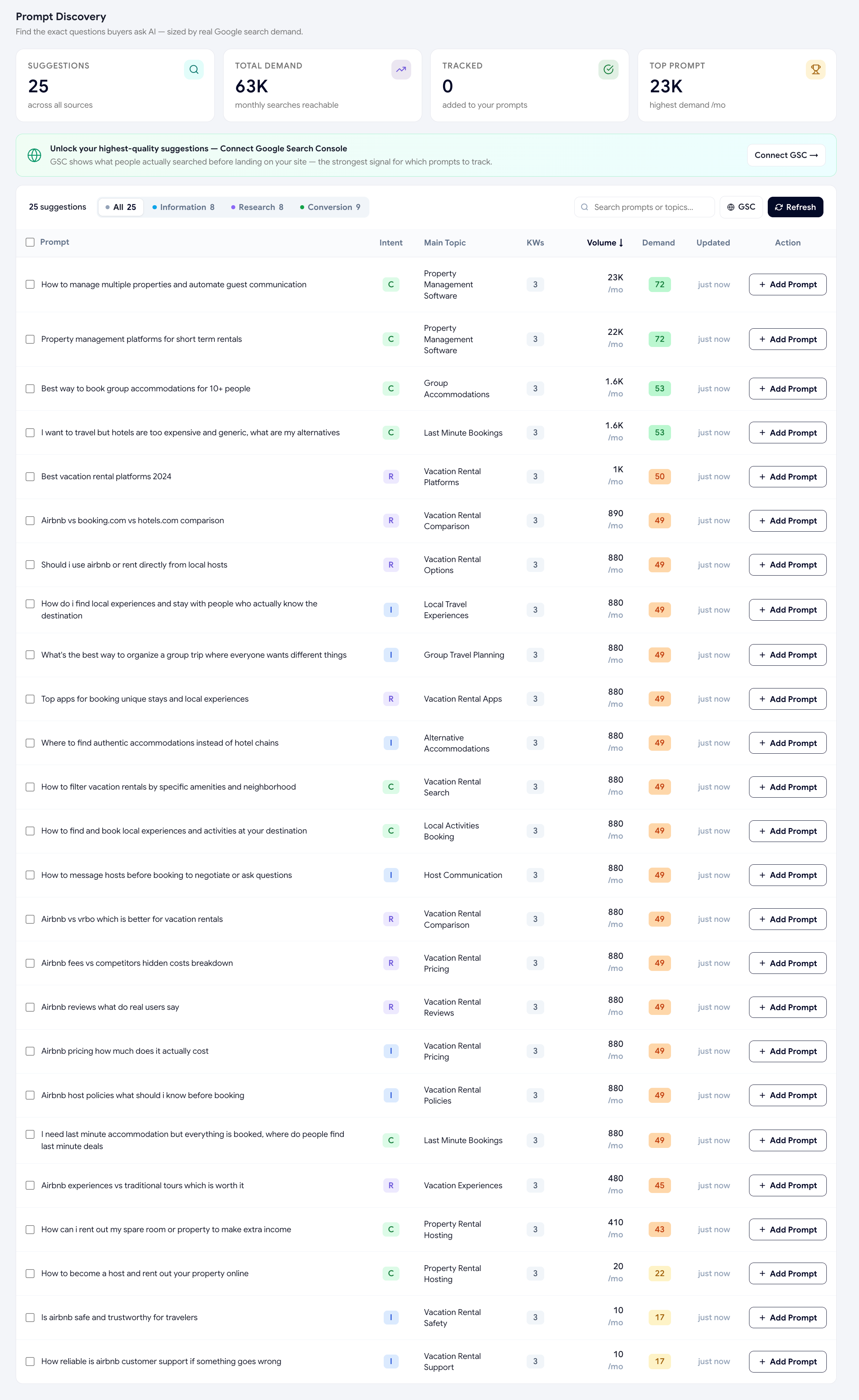
- SuggestionsHow many candidates are currently in your feed across all sources.
- Total demandSum of monthly Google searches across every prompt in the feed — your reachable market.
- TrackedHow many you've already added to your prompt list.
- Top promptHighest single-prompt demand in the feed (the one to track first).
The 3-bucket intent model
Every candidate is automatically classified into one of three buying-intent buckets, shown as a single-letter pill in the table:
| Pill | Intent | Means |
|---|---|---|
| I (blue) | Information | "What is", "how does", "explain" — the user is learning. |
| R (purple) | Research | "Best", "vs", "compare", "review" — the user is evaluating options. |
| C (green) | Conversion | "Pricing", "buy", "sign up", "demo" — the user is ready to act. |
Conversion prompts are usually the highest ROI to track first — fewer queries but each one is a buyer at the bottom of the funnel. Filter the table by Conversion to surface them.
The Demand Score (0–100)
The colored box in the Demand column is a logarithmic score of the prompt's combined keyword search volume:
- 0 (gray) — Niche. No measurable monthly volume.
- 1–30 (yellow) — Emerging. Small but trackable demand.
- 31–50 (orange) — Moderate. Worth tracking.
- 51–75 (light green) — Strong. Should be in your scan list.
- 76+ (bright green) — Excellent. Track immediately.
A "Niche" pill means the exact phrase is too long-tail for Google to report a monthly search volume — but it may still surface in conversational AI. Track Niche prompts if they're conversion-stage and competitor-targeted.
How to use it
-
Open Prompt Discovery
Sidebar → Improve → Prompt Discovery. The page auto-loads cached suggestions if they're less than 24 hours old; otherwise it generates fresh ones (~30–60s).
-
Filter by intent
Click the Information / Research / Conversion tabs to focus on one buyer stage at a time.
-
Sort by demand
Click the Volume or Demand column header to rank prompts by market opportunity. The default sort is highest demand first.
-
Bulk-add the winners
Tick the checkbox on each row you want to track, then click Add all to tracking in the floating bar that appears at the bottom of the screen.
-
Refresh when the market moves
The Refresh button regenerates the feed from all six sources and re-scores every prompt. Run this monthly, or any time you ship a major launch.
Reading a row
Each row shows seven pieces of information:
- Checkbox — for bulk selection.
- Prompt — the candidate question, displayed in sentence case.
- Intent pill — I / R / C with color coding (hover for the full label).
- Main Topic — a 2–4 word topical label extracted by AI (e.g., "CRM Software", "Email Marketing").
- KWs — count chip showing how many underlying keywords were extracted (hover to see them).
- Volume — combined monthly Google searches across this prompt's keywords.
- Demand — the 0–100 score described above.
- Updated — when this prompt's volume was last refreshed.
- Add Prompt — single-click track button.
How often to re-run discovery
Prompt Discovery re-fetches its data on demand. We recommend running it:
- Once a month — enough to catch trending discussions without drowning in noise.
- After a product launch — surface new prompts that mention your new feature.
- After a competitor launch — surface new comparison prompts you should be defending.
Was this page helpful?
Thanks for the feedback — we read every response.