
AI responses explorer
Charts and gauges are summaries — the AI Responses page is where you read the actual answers Scout collected. It's the most important page in the dashboard for qualitative insight, and the place every content fix starts.
Where to find it
Sidebar → AI Responses. You'll see a table of every response from your most recent scan.
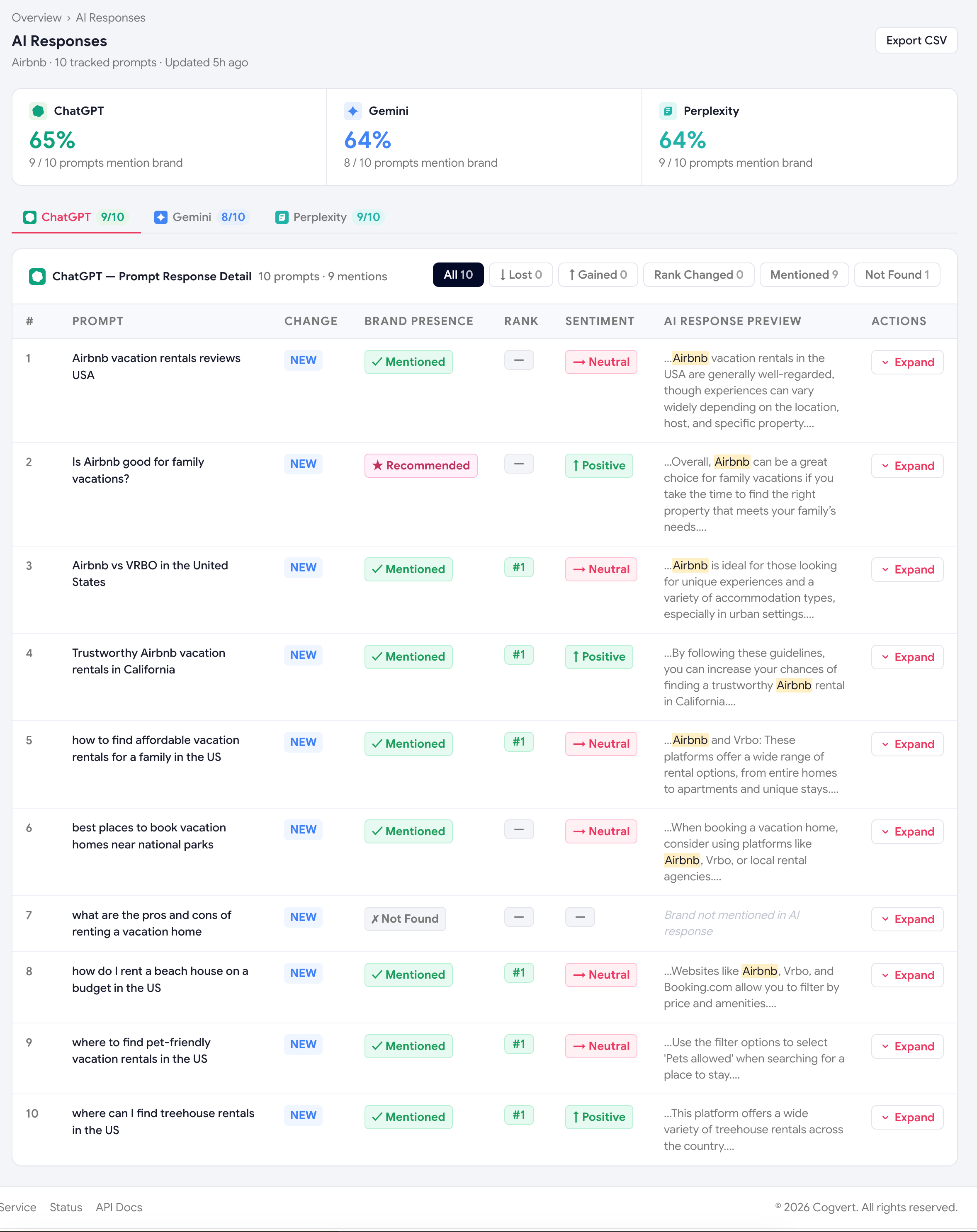
What each row contains
| Column | Meaning |
|---|---|
| Engine | Which AI engine produced the answer (ChatGPT / Gemini / Perplexity). |
| Prompt | The exact buyer question Scout sent in. |
| Excerpt | A snippet of the answer with your brand and tracked competitors highlighted. |
| Mentioned? | ✓ if your brand name appeared anywhere in the answer. |
| Recommended? | ✓ if the AI actively recommended your brand (not just listed it). |
| Position | Where you appeared in the answer (1 = first). |
| Sentiment | Positive / Neutral / Negative chip. |
Filtering
The filter bar lets you narrow the view by:
- AI engine
- Topic
- Mentioned / Not mentioned
- Recommended / Not recommended
- Sentiment (positive, neutral, negative)
- Specific prompt
Three filters worth bookmarking
- Not mentioned + your top topic — instant list of "where am I invisible?" prompts.
- Mentioned + Not recommended — prompts where you're losing head-to-heads. Highest leverage.
- Negative sentiment — your brand-safety watchlist. Read these every week.
The expanded view
Click any row to expand it and see:
- The full answer — every word, not just the excerpt.
- The structured analysis — JSON output from the analysis pass (great for debugging).
- The cited sources — every URL the AI quoted (mostly populated by Perplexity).
- The competitor reasons — when the AI explained why it recommended a competitor.
Using responses to write content
The AI Responses page is the raw material for everything in the Optimize Hub. The workflow:
Filter to "Not mentioned" + your weakest topic
Read 5–10 answers and look for patterns
What sources is the AI citing? What competitor reasons keep appearing?
Open the matching Content Suggestion
Scout has usually pre-written a brief based on the same patterns.
Write the page, ship it, re-scan in 2 weeks
Was this page helpful?
Thanks for the feedback — we read every response.