AI Optimization

Don't just track.
Fix it.

Three optimization pillars working together, content suggestions, technical audits, and citation strategies, so you know exactly what to fix and how to fix it.

app.cogvert.com — Expedia Optimize Hub
Optimize Hub: Expedia
18 actionable fixes across Content, Technical & Citations
Content: 7 suggestions Technical: 5 issues Citations: 6 opportunities
Total Fixes
18
3 new this week
Completed
12
67% done
Score Impact
+14
pts estimated
Priority
3
high-impact fixes
Content Suggestions
Best travel apps 2025MISSING
Budget travel platformsWEAK
Hotel booking comparisonMISSING
Technical & Audit
Schema markup missingCRITICAL
FAQ structure neededMEDIUM
Meta descriptions thinMEDIUM
Citations
TripAdvisor listingCITED
NerdWallet mentionNOT CITED
Forbes Travel GuideOUTDATED
What Is AI Optimization?

Three pillars. One system.
Everything you need to improve.

Knowing your AI Visibility Score is step one. AI Optimization is step two: a three-pillar system that tells you exactly what to fix, where to fix it, and how to measure the result.

The Three Optimization Pillars

Track. Diagnose. Fix. Re-test.

Each pillar targets a different lever of AI visibility, so you're never guessing what to do next.

📝
Content Suggestions
See exactly which prompts your brand is missing from, and get AI-generated content recommendations to close the gap.
Expedia — Content Gaps
Best travel apps 2025 Not mentioned
Cheap flights comparison Rank #5
All-inclusive vacation deals Not mentioned
Suggested: Publish comparison guide for "best travel apps" targeting AI citation
🔬
Technical and Audit
The AI Audit Agent scans your website for schema markup, page structure, and technical issues that affect how AI models read your site.
AI Audit — expedia.com
Organization schema Missing
FAQ structured data Incomplete
Content depth score Good
Fix: Add Organization + FAQPage schema to improve AI comprehension
🔗
Citations
Discover where your brand needs to be cited, listed, and referenced: the external signals AI models use to validate your authority.
Expedia — Citation Sources
TripAdvisor Cited
NerdWallet Not cited
Forbes Travel Outdated
Priority: Get listed on NerdWallet travel comparison page
The Optimize Hub

One dashboard connecting
all your optimization tools

The Optimize Hub is your central command center, pulling content gaps, technical fixes, and citation opportunities into one prioritized action list.

Optimize Hub — Expedia
Prioritized action list across all 3 pillars
Add Organization schema to homepage TECHNICAL
Publish "best travel apps" comparison content CONTENT
Get listed on NerdWallet comparison CITATION
Add FAQ structured data to /deals page TECHNICAL
Update Forbes Travel Guide listing CITATION
18
Total fixes
12
Completed
+14 pts
Est. impact
📋

Prioritized action list

Every fix is ranked by estimated score impact, so you always know which action moves the needle most.

🔄

Progress tracked across pillars

See how many fixes you've completed and what's still pending, across content, technical, and citations.

📈

Measured impact

After each scan, see whether your fixes actually improved your AI Visibility Score: the closed-loop feedback you need.

🎯

Fixes surface automatically

As AI models change their responses, new optimization opportunities appear in your hub, so you're always ahead.

How It Works

The loop that keeps you ahead of AI

AI Optimization isn't a one-time fix. It's a continuous improvement loop: track, diagnose, fix, re-test.

1
Track
Monitor your AI Visibility Score across all models and prompts.
2
Diagnose
Identify content gaps, technical issues, and missing citations.
3
Fix
Apply content, technical, and citation fixes from the Optimize Hub.
4
Re-test
Run another scan and see your score improve: proof your fixes worked.
Live in product

From insight to action in three clicks

The Optimize Hub turns every visibility gap into a specific, prioritized task, across five channels and an executable plan.

The Hub

Five action channels in one prioritized view

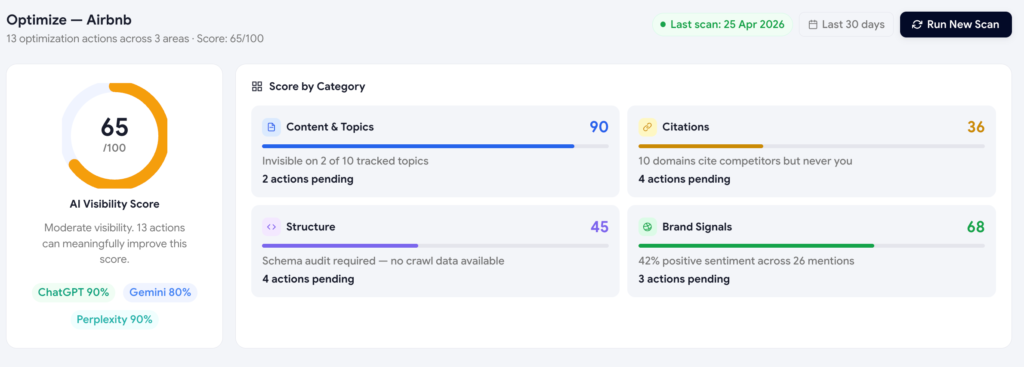
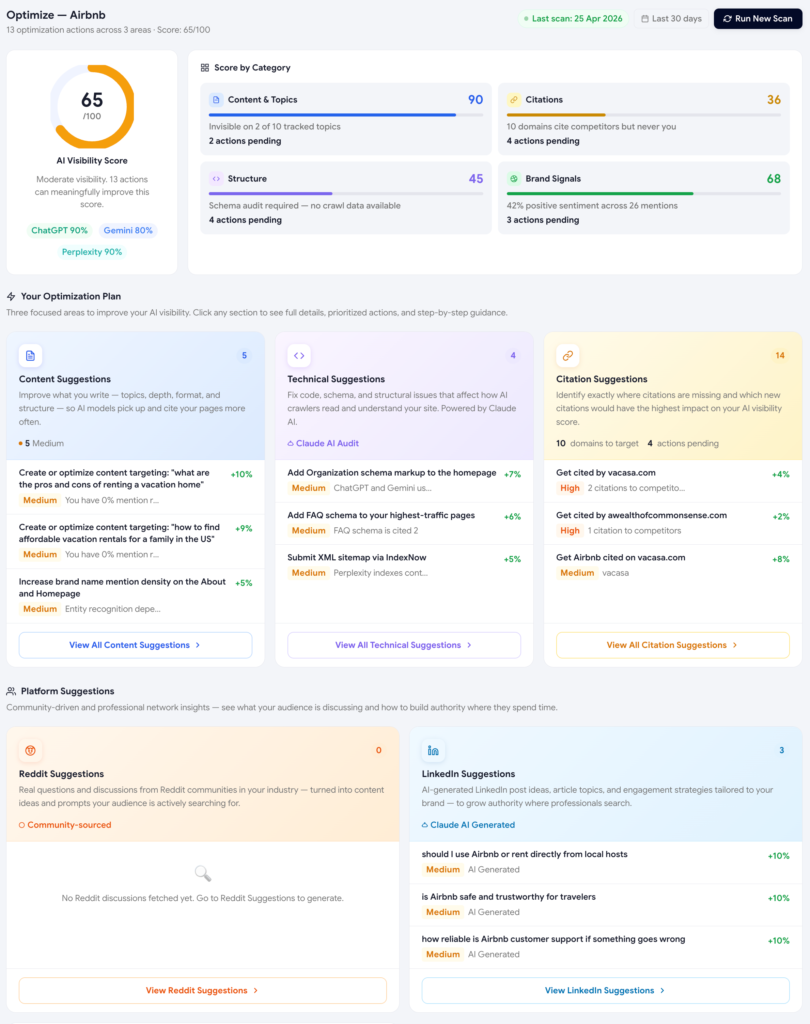
The Optimize Hub is built as a hub-and-spoke: a single overview shows your score, your four pillars, and a card for each action channel, with the channel that needs the most work surfaced first.

  • Score ring and four-pillar grid: instantly see which lever to pull.
  • Five spokes: Content, Technical, Citations, Reddit, LinkedIn.
  • A sixth spoke on Premium: a full AI Audit Agent crawl of your site.
Optimize Hub with score ring, four-pillar grid and five action channels
Inside a spoke

Recommendations sorted by impact, not by date

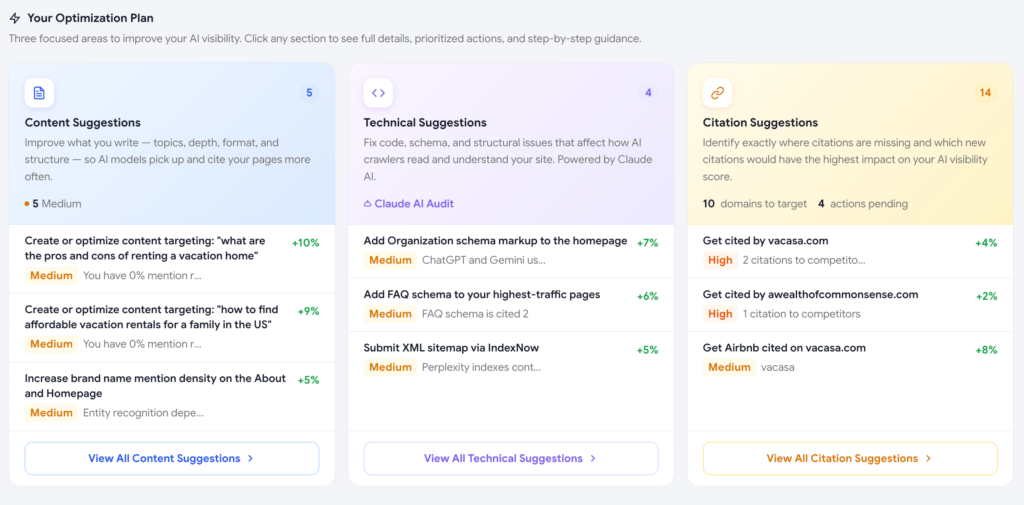
Each spoke is a focused workspace. Every recommendation is sorted by estimated point impact on your visibility score, and tagged with status: To Do, In Progress, Done, or Ignored. You always know what to ship next.

  • Impact estimate on every action, so you can sequence by ROI.
  • Status workflow tracked per recommendation across scans.
  • Auto-verify on the next scan: Scout confirms whether the action moved the score.
Inside an optimization spoke with prioritized recommendations
Optimization Plan

Every action tied to the prompts and demand it will move

The Optimization Plan view stitches together every recommendation across all five spokes and pairs each one with the prompts it will improve and the underlying search demand at stake. The "is this worth doing?" question answers itself.

  • Prompts impacted per recommendation, with their volume and demand.
  • Total demand reach for the action, not just an abstract score.
  • Sortable by demand, impact, or status.
Optimization Plan listing recommendations with prompt and demand context
Citation Suggestions

The exact domains AI cites, and where to get listed

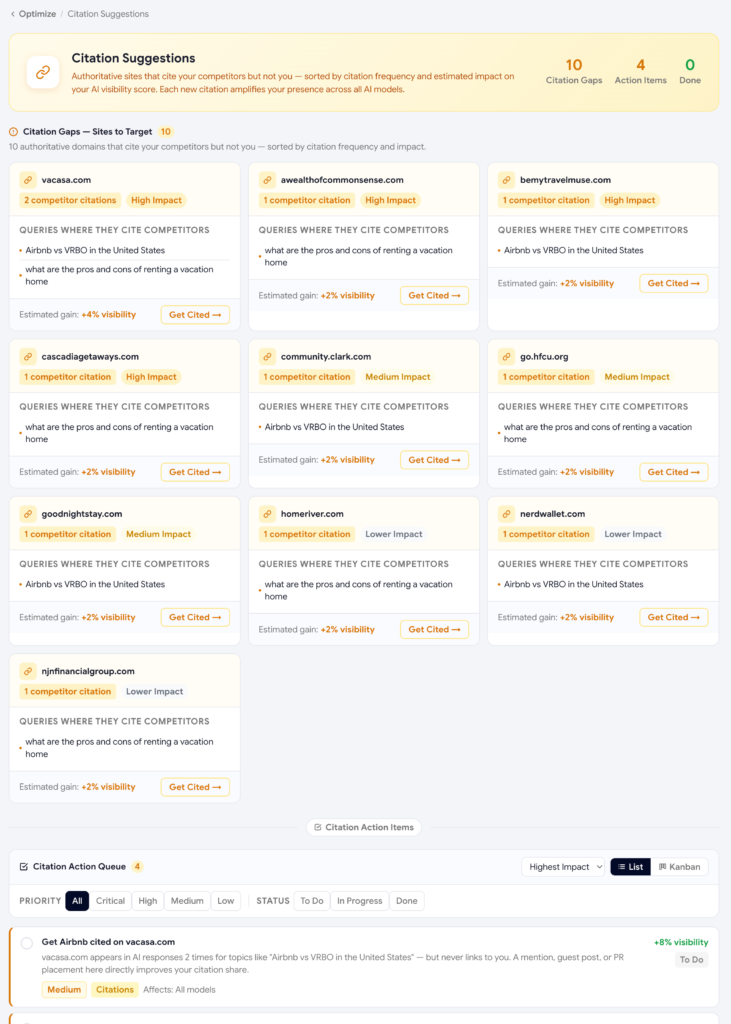
Citations are the biggest driver of AI visibility you don't control directly. The Citation Suggestions spoke surfaces the third-party domains AI engines cite most in your category, and tells you exactly which ones you're missing.

  • Citation gaps: high-frequency domains that cite competitors but not you.
  • Citation actions: claim G2, submit to Capterra, pitch the roundup blog.
  • Auto-confirm wins: Scout watches for the new citation in your next scan.
Citation Suggestions with target domains and pitch actions
FAQ

Common questions about AI Optimization

What's the difference between AI Optimization and the AI Visibility Score?

The Visibility Score tells you where you stand: a single number summarizing your AI presence. AI Optimization is the next step: it takes every gap behind that score and turns it into a specific, prioritized fix across content, technical, and citation work. One is the diagnosis, the other is the treatment.

How does Scout decide which fixes to prioritize first?

Every recommendation in the Optimize Hub is ranked by its estimated impact on your visibility score. Fixes expected to move the score the most surface at the top, so you're always working on the highest-leverage task rather than whatever was added most recently.

Do I need the Premium plan to get technical and citation fixes?

No. Content Suggestions are included on the free plan. Technical Audit and Citation Suggestions are available on paid plans, and the full AI Audit Agent crawl, the sixth spoke in the Optimize Hub, is exclusive to Premium.

How does Scout know if a fix actually worked?

Once you mark a recommendation as done, Scout auto-verifies it on your next scan by checking whether the related score, mention, or citation actually changed. That closes the loop between shipping a fix and confirming it moved the needle, instead of leaving you to guess.

What happens if I ignore a recommendation instead of fixing it?

You can mark any recommendation as Ignored, and it moves out of your active To Do list without being deleted. This keeps the hub focused on fixes you actually intend to ship, while still preserving the full list of gaps Scout has identified.

Will new fixes keep appearing, or is this a one-time list?

New fixes surface automatically as AI models change how they answer and as your competitors' visibility shifts. The Optimize Hub is designed to be revisited every scan cycle, not worked through once and closed out.

Ready to stop guessing and start fixing?

Get your first optimization recommendations in minutes.
Free plan includes Content Suggestions; upgrade for Technical Audit and Citations.