See exactly what AI says
about your brand
Every model, every prompt, every scan. Monitor how ChatGPT, Gemini, and Perplexity mention, rank, and recommend your brand across every prompt you track.
| Prompt | ChatGPT | Gemini | Perplexity | Rank | Change |
|---|---|---|---|---|---|
| Best travel booking app | Recommended | Mentioned | Recommended | #1 | — Stable |
| Cheapest flights online | Mentioned | Recommended | Mentioned | #2 | ↑ Rank +1 |
| Best hotel deals | Recommended | Not Found | Mentioned | #2 | × Lost in Gemini |
| Top vacation packages 2026 | Mentioned | Mentioned | Recommended | #1 | ✓ Gained in Perplexity |
| Best flight comparison site | Not Found | Mentioned | Not Found | #3 | ↓ Rank −2 |
| All-inclusive resort booking | Recommended | Recommended | Mentioned | #1 | ✓ Now #1 |
The raw data behind
every AI conversation about you
Traditional monitoring tracks news articles and social posts. AI Brand Monitoring tracks something entirely different: the actual responses that ChatGPT, Gemini, and Perplexity give when users ask about your industry, your competitors, or your brand by name.
Track the AI models
that shape buying decisions
Each AI model has its own training data, its own biases, and its own way of recommending brands. Scout monitors all three simultaneously so you never miss where you're visible, or invisible.
Know exactly what changed
between every scan
The Change column shows you what shifted since your last scan. No more guessing: every lost mention, every gained recommendation, every rank movement is surfaced automatically.
Lost mentions
A model mentioned you last scan but doesn't anymore. You need to know this immediately, before competitors fill the gap.
Gained mentions
You appeared in a new model's response. Your content optimization is working, or a competitor just dropped out.
Rank movements
Track whether you're moving up or down in AI responses. Being mentioned at #1 versus #5 makes a massive difference in user trust.
Status upgrades
When a model goes from "Mentioned" to "Recommended" for your brand, that's a signal your authority is growing.
See the before and after
of every AI response
Click any prompt to expand it and see the full AI response from both the previous and current scan. Highlighted diffs show exactly what the model added, removed, or changed about your brand.
Monitoring is step one.
Here's what comes next.
AI Brand Monitoring shows you the problem. These features help you fix it: improve your content, track competitors, and boost your visibility score.
Every AI answer. Every engine. Every scan.
Drill into the raw responses, then slice by ChatGPT, Gemini, and Perplexity to find your weak engine.
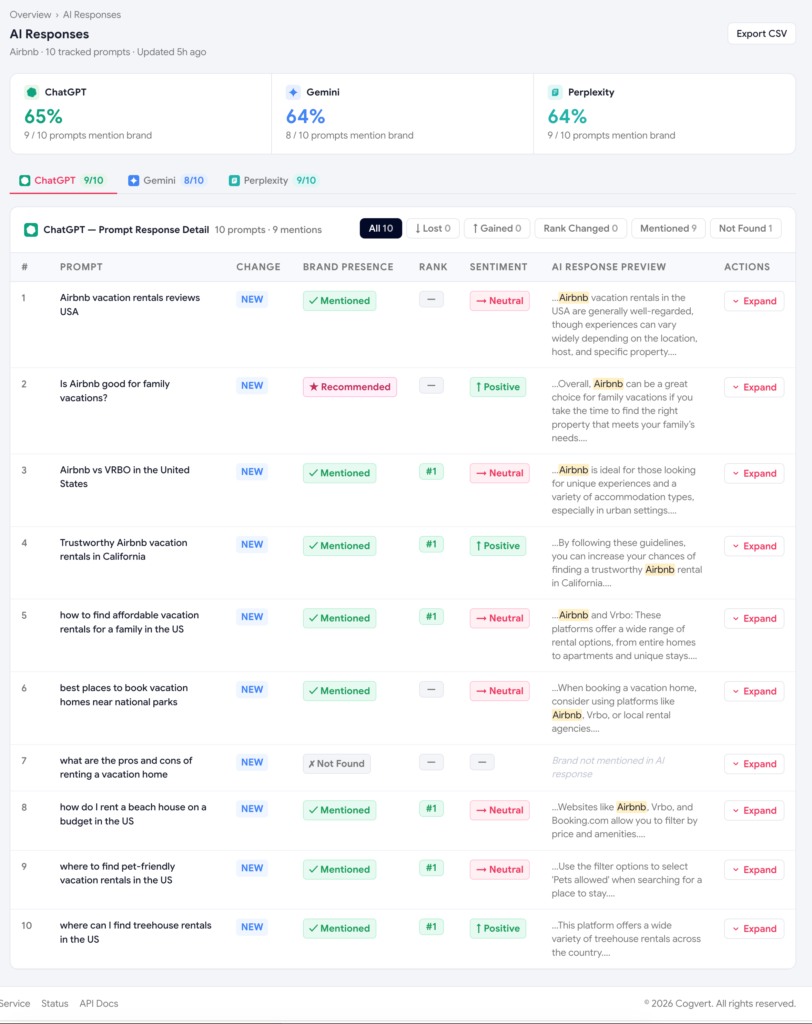
Read every word the AI said about you
Charts and gauges are summaries. The AI Responses page is where you read the actual answers Scout collected. Every fix in the Optimize Hub starts here.
- Brand and competitor highlighting in every excerpt.
- Mention, Recommendation, Position, and Sentiment chips per row.
- A smart filter bar to find lost mentions, head-to-head losses, and negative sentiment in one click.
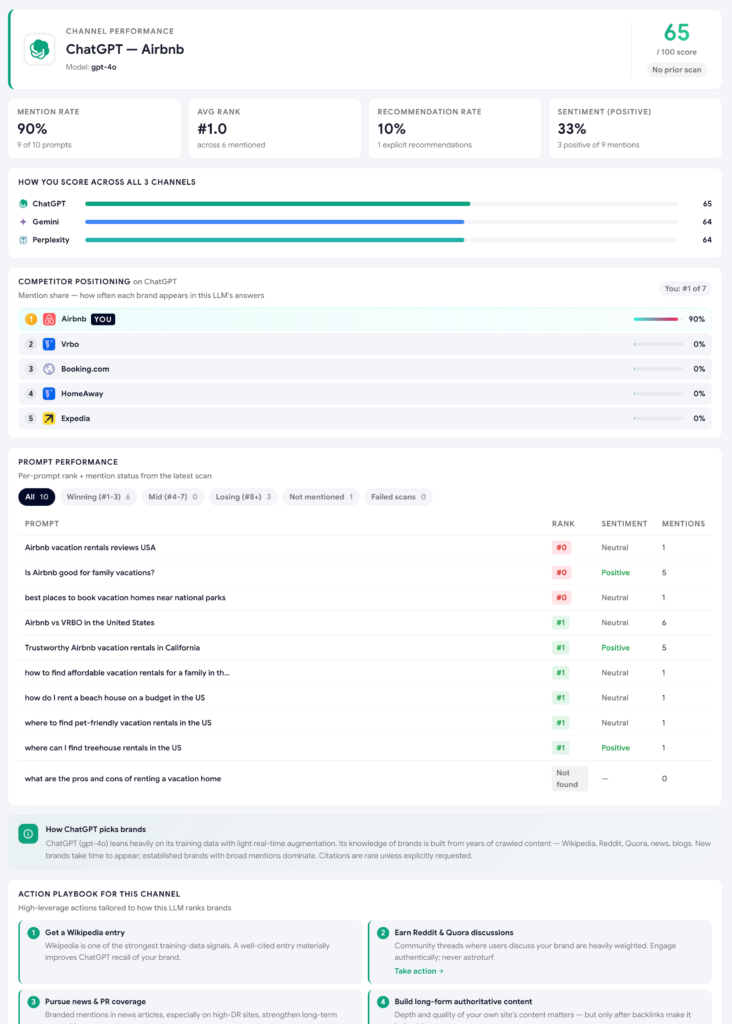
A dedicated dashboard for the AI most of your buyers use
ChatGPT has the largest user base. Scout's per-engine view isolates your visibility, mention rate, and best-performing prompts on gpt-4o, so you can spot whether ChatGPT is your strength or your weak spot.
- Per-engine score gauge with the change versus the previous scan.
- Top-performing prompts on this engine specifically.
- Per-model sentiment, since ChatGPT can love you while Gemini barely knows you.
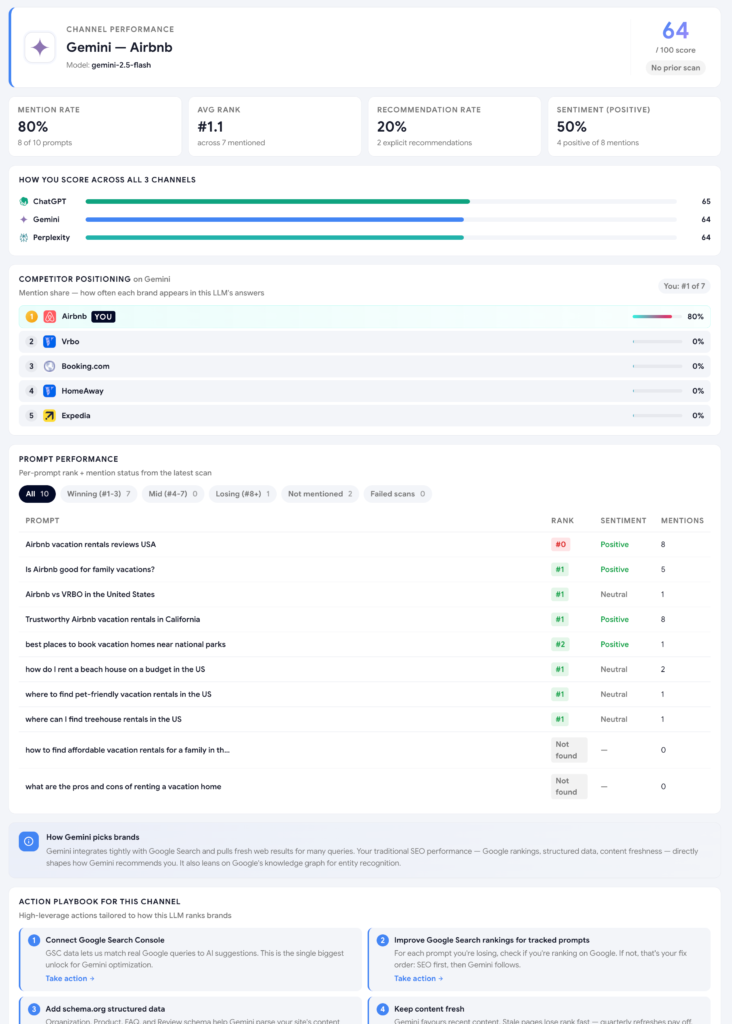
Same shape, isolated to Google's flagship engine
Gemini reflects Google's web view: it favors brands with strong organic SEO, healthy backlink profiles, and active YouTube content. Scout's Gemini dashboard tells you exactly how Google's AI sees your brand on gemini-2.5-flash.
- Spot the divergence: strong on ChatGPT but weak on Gemini usually signals an SEO problem.
- See which prompts you've already won on Google's engine.
- Track movement scan over scan after a content sprint.
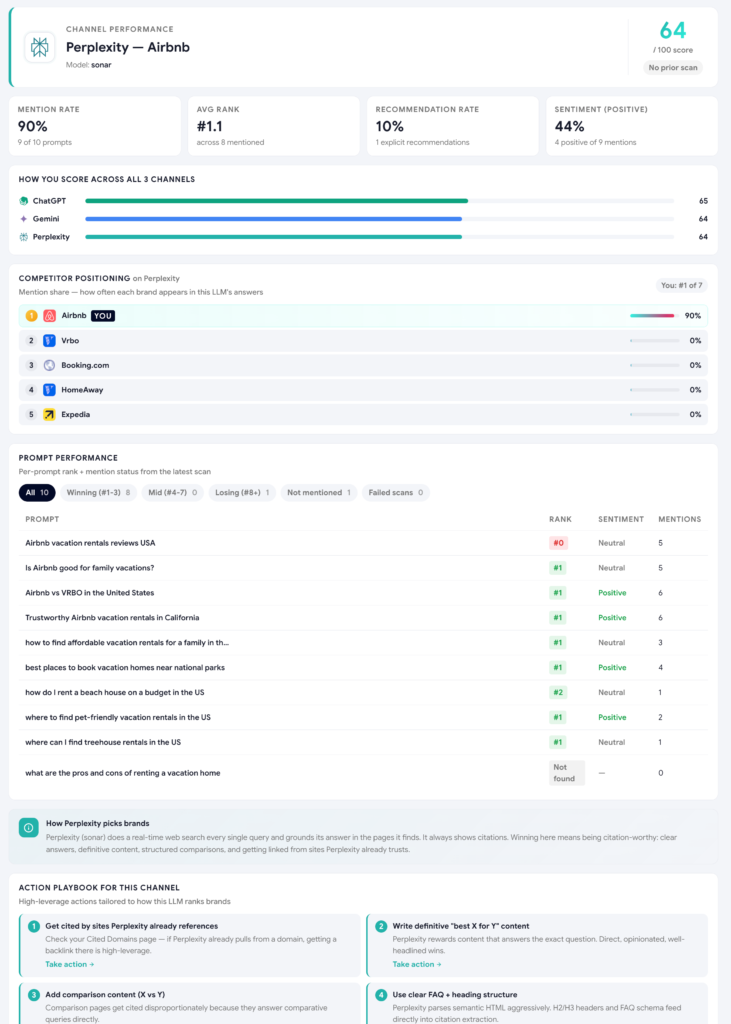
The AI engine that always cites its sources
Perplexity grounds every answer in real-time web search and returns explicit citation links. That makes it the most reliable signal for who AIs trust about your category. Scout's Perplexity view surfaces your performance on sonar.
- Real-time web search, so answers reflect what's published right now.
- Citation tracking: every URL Perplexity quoted, in one feed.
- The best signal for tracking PR coverage, Reddit threads, and recent reviews.
Common questions about AI Brand Monitoring
How is AI Brand Monitoring different from social listening or media monitoring tools?
Traditional monitoring tracks what people write about you: news articles, social posts, reviews. AI Brand Monitoring tracks what AI models say about you when someone asks a question. It's a fundamentally different data source: the actual generated response, not a mention someone else published.
Why would my brand be mentioned on ChatGPT but not on Gemini for the same prompt?
Each model is trained on different data, weighted differently, and updated on its own schedule, so it's common for one engine to know your brand well while another barely recognizes it. This page's per-model dashboards exist specifically to help you spot that gap and figure out which engine needs the most work.
What counts as a "lost mention" versus a normal fluctuation?
A lost mention means a model included your brand in its answer on the previous scan but dropped you entirely on the current one for the same prompt. Scout flags this distinctly from rank changes or sentiment shifts because a full drop is usually the highest-priority issue to investigate first.
Can I see the exact wording an AI model used about my brand, not just a score?
Yes. The AI Responses page shows the full text of every response Scout collected, with your brand and competitors highlighted. The Expand feature goes further, showing a side-by-side diff between your previous and current scan so you can see exactly what changed in the model's wording.
How often should I expect scan-to-scan changes to show up?
This depends on your scan frequency and plan tier. Manual scans only show changes when you choose to run them; Starter and Growth plans add weekly or daily auto-scans, which surface changes more frequently since AI models update their training data and retrieval sources on their own schedules, not yours.
Does Scout tell me why a mention was lost or gained, or just that it happened?
The Change summary tells you what happened: which prompt, which model, and the direction of the shift. To understand why, the Expand Any Prompt view shows you the actual response text so you can read the model's reasoning yourself, and the Optimize Hub then turns that gap into a specific fix to address it.
What are AI models saying about your brand?
Find out in 5 minutes. Track up to 5 prompts free, no credit card required.