
Search
Locations

Account & Billing

Public report sharing
Reports are most useful when stakeholders can read them. Scout’s public-share system gives you a unique read-only URL for any report — your client, founder or board doesn’t need an account, just the link.

How sharing works

Open any report

Sidebar → Reports → click any past report, or generate a new one.

Click "Share"

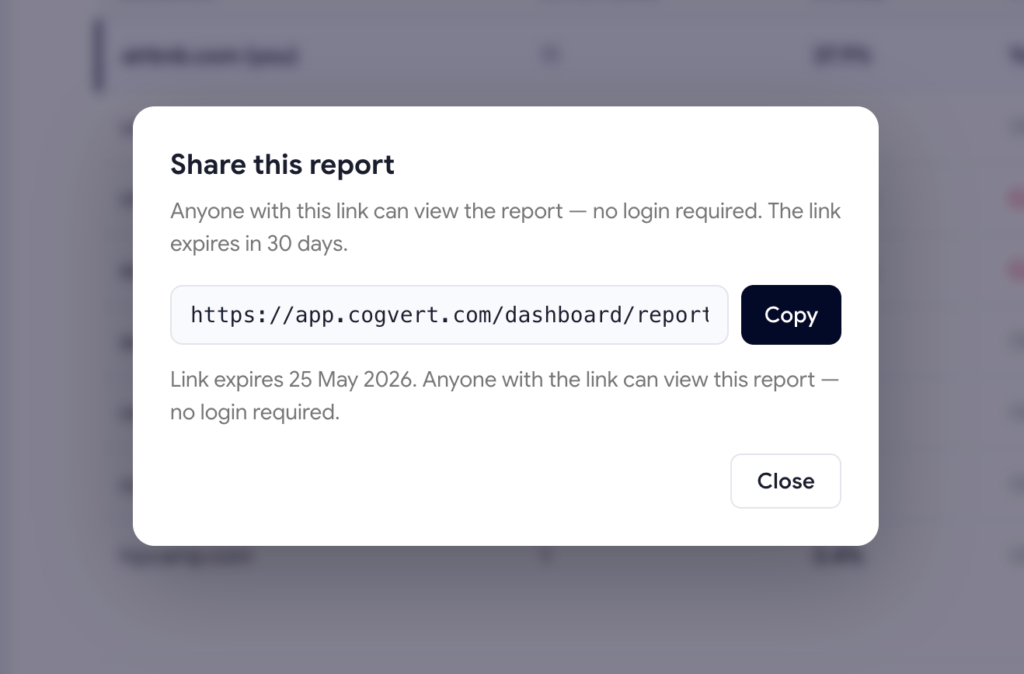
The Share dialog appears with a freshly generated public URL containing a long random token.

Pick the time window and TTL

Choose 7, 30 or 90 days of data and how long the link should stay live (default: 30 days).

Copy the URL and send it

The recipient just clicks the link — no login, no signup, no Scout account needed.

What the recipient sees

The shared report shows everything the logged-in version shows:

  • Visibility Score with trend
  • Per-LLM scorecards
  • Visibility Trend chart
  • Demand Coverage module (top demand prompts + most expensive gaps)
  • Top 10 Prompts performance per LLM
  • Competitor leaderboard
  • Top cited pages and domains


What’s hidden: the dashboard sidebar, header actions, the “Run scan” button — anything that requires authentication. The report itself is fully self-contained.

How the AI Audit Works

Tokens are unguessable

Every share link uses a 48-character random hex token (2192 possible values). Sequential IDs are never exposed. Even if someone has one of your share URLs, they can’t enumerate or guess others.

Revocable instantly

Click
Revoke
in the Share dialog and the URL stops working immediately. No 24-hour cache, no propagation delay.

Auto-expires

Links expire after the TTL you set (1–365 days). Expired links return a 401 error.

View-counted

Scout tracks how many times each share link has been opened, so you know if a stakeholder actually clicked through.

Read-only by design

Share viewers can't edit anything, run scans, or see other reports. The token is scoped to one report only.

When to use share links

Use caseTTL recommendation
Weekly client update14 days (long enough for them to circle back)
Board / investor update30 days
Sales-deck embed90 days
One-off founder review7 days

Embed in client decks

The shared report URL is just a regular web page — embed it as an iframe in Notion, Coda or any deck tool. Stakeholders see the live report instead of a frozen screenshot.
Web Design
Development
SEO

Organic Search

SEO Growth (Search Engine Optimization)


SEO growth increases visibility, drives organic traffic, and boosts business performance.

SEO Growth (Search Engine Optimization)


SEO growth increases visibility, drives organic traffic, and boosts business performance.

Organic Search

SEO Growth (Search Engine Optimization)


SEO growth increases visibility, drives organic traffic, and boosts business performance.

SEO Growth (Search Engine Optimization)


SEO growth increases visibility, drives organic traffic, and boosts business performance.